Highlight

2026-01-15

Climate Change

Earth has generably been warming for the past 22,025 years (+5 degrees Celsius), but about 1 degree of that was in the past 40 years. Are human activities causing climate change?

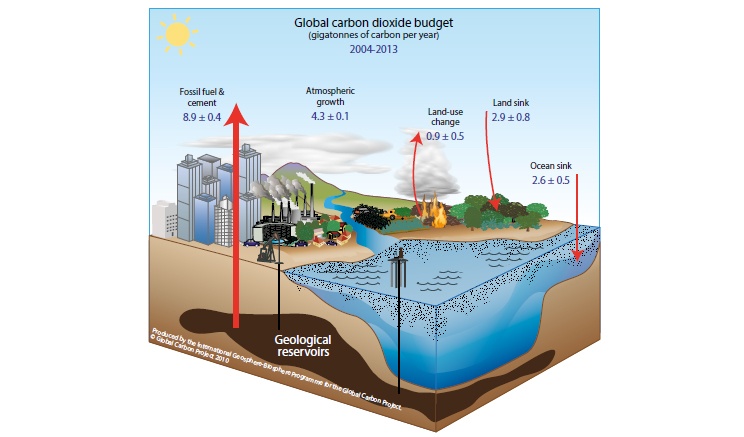
3D drawing of an oil well, city, nature, and ocean, labeled with amounts of carbon in/out
9.8 up - 5.5 down = 4.3 gigatonnes of carbon per year extra from fossil fuel & cement

That image lacks methane from melting Siberian permafrost (Just top that up? Helsinki's 2010-2011 snow mountain lasted the hot summer of 2014. Maybe bring back the Ice King or do some ground refrigeration like at Fukushima.), but fortunately smoke from wars and cars appears to reflect sunlight before the rest of Earth soaks it up. Maybe burnt sacrifices (being carbon neutral if using recently grown wood) weren't so bad after all compared to the Sun cooking us.

2026-01-09

Everything you need to know about Unicode in Perl on Windows

I've now solved the display issue by making my Perl script change the codepage to 65001 just like CMD's `dir` does:
use feature ":5.16";  # Include say and Unicode string functions.
use open ':std', ':encoding(UTF-8)';  # Print Unicode without complaining about wide chars.
use utf8;  # Unicode source code.
use strict;  # Don't ignore undefined variables.
use Win32::Console;

Win32::Console::OutputCP(65001);  # Tell Windows Terminal to render Unicode (with unclustered graphemes in 1.23.13503.0 but they copy/paste ok).

my $file_name = "emoji_🎅🎉😀💢👩🏾‍🚀.txt";

say "Writing to ${file_name}";
open( my $fh, ">", $file_name ) or die "Can't write $file_name: $!";
binmode($fh, ":encoding(UTF-8)");  # encoding() also checks UTF-8 validity, unlike ":utf8".
say $fh "My name is \"$file_name\".";
close($fh);

say "Reading ${file_name}";
open( $fh, "<", $file_name ) or die "Can't read $file_name: $!";
binmode($fh, ":encoding(UTF-8)");
read($fh, my $buf, 100);
say $buf;
close($fh);

say "Done.";
This won't affect the codepage of the terminal after, just like `dir`: And despite the female black astronaut not rendering as a single character, it copy/pastes just fine:
15:23:45 C:\apps\StrawberryPerl\perl\bin>chcp
Active code page: 850

15:23:50 C:\apps\StrawberryPerl\perl\bin>perl C:\Users\C\Documents\code\Perl\test_unicode.pm
Writing to emoji_🎅🎉😀💢👩🏾‍🚀.txt
Reading emoji_🎅🎉😀💢👩🏾‍🚀.txt
My name is "emoji_🎅🎉😀💢👩🏾‍🚀.txt".

Done.

15:23:53 C:\apps\StrawberryPerl\perl\bin>chcp
Active code page: 850
Unfortunately, writing the emoji file name only appears to work correctly inside a shell inside VS Code; not inside a shell inside Windows Terminal 1.23.13503.0: Newer languages like Python do work.
file_name = "emoji_🎅🎉😀💢👩🏾‍🚀.py.txt"

print(f"Writing to {file_name}")
with open(file_name, "w", encoding="utf8") as f:
    f.write(f"My name is \"{file_name}\".")

print(f"Reading {file_name}")
with open(file_name, "r", encoding="utf8") as f:
    print(f.read())

print("Done.")

2025-11-05

GPG - GNU Privacy Guard

GPG is an open source version of PGP - Pretty Good Privacy - which uses public-private key pairs to sign hashes or encrypt content to verify integrity and origin.

Today with help from ChatGPT I finally used it in Git Bash on Windows 11 to verify the Cygwin installer in order to install GCC to compile the backend for Grafana to test a patch for a label regression in 1.6. (Update: I'll just make run in GNU/Linux.)

First inspect and remember the public keys, lest you get "gpg: Can't check signature: No public key":

C@MSI MINGW64 ~/Documents/code/GitHub/grafana (main)
$ gpg --show-keys "C:\Users\C\Downloads\cygwin_pubring.asc.txt"
pub   dsa1024 2008-06-13 [SC] [expired: 2022-09-03]
      1169DF9F22734F743AA59232A9A262FF676041BA
uid                      Cygwin <cygwin@cygwin.com>
sub   elg1024 2008-06-13 [E] [expired: 2022-09-03]

gpg: WARNING: No valid encryption subkey left over.
pub   rsa4096 2020-02-27 [SC] [expires: 2027-02-27]
      56405CF6FCC81574682A5D561A698DE9E2E56300
uid                      Cygwin <cygwin@cygwin.com>


C@MSI MINGW64 ~/Documents/code/GitHub/grafana (main)
$ gpg --import "C:\Users\C\Downloads\cygwin_pubring.asc.txt"
gpg: /c/Users/C/.gnupg/trustdb.gpg: trustdb created
gpg: key A9A262FF676041BA: public key "Cygwin <cygwin@cygwin.com>" imported
gpg: key 1A698DE9E2E56300: public key "Cygwin <cygwin@cygwin.com>" imported
gpg: Total number processed: 2
gpg:               imported: 2
gpg: no ultimately trusted keys found
GPG is just noting that the encryption subkey [E] has expired. Key capabilities:
LetterMeaningDescription
SSignUsed to create digital signatures — for signing messages or files (like the .sig file from Cygwin).
CCertifyUsed to sign other keys — e.g. when one key "certifies" that another key belongs to someone (building the “web of trust”). Usually part of the primary key’s role.
EEncryptUsed to encrypt data so only the matching private key can decrypt it. Typically found on a subkey.
AAuthenticateUsed to prove identity in secure communication (e.g. SSH or email authentication). Not common on signing keys for software releases.

Then verify the signature of the executable:

C@MSI MINGW64 ~/Documents/code/GitHub/grafana (main)
$ gpg --keyid-format=long --with-fingerprint --verify /C/Users/C/Downloads/setup-x86_64.exe.sig /C/Users/C/Downloads/setup-x86_64.exe
gpg: Signature made Thu, May 22, 2025  4:49:21 PM WEDT
gpg:                using RSA key 56405CF6FCC81574682A5D561A698DE9E2E56300
gpg: Good signature from "Cygwin <cygwin@cygwin.com>" [unknown]
gpg: WARNING: This key is not certified with a trusted signature!
gpg:          There is no indication that the signature belongs to the owner.
Primary key fingerprint: 5640 5CF6 FCC8 1574 682A  5D56 1A69 8DE9 E2E5 6300
You can also encrypt a file with gpg -c secret.txt, decrypt it with gpg -d --output secret.txt secret.txt.gpg, and verify "gpg: decrypt_message failed: Unknown system error" was due to a corrupt/incomplete file using sha1sum secret.txt.gpg

2025-10-13

Is the USA ok?

YouTube and/or some people who don't like serious conversations tends to disappear comments, so here's a copy of one with links to sources:
It appears that not a day goes by in the USA without somebody shooting multiple people, hence my question since people seem tired of talking about them.

According to a 2012 Guardian article on gun homicides, the average per 100k people gun homicide rate was 4.9 globally, 3.0 for the US, and 0.4 for Europe (not counting Kosovo, Montenegro, and Russia due to missing data).

In for example 1956 when US schools had gun safety classes, Wikipedia only lists a page for Asia. 1954 had one mass shooting in the US Capitol though. The total US population, including Armed Forces overseas, was about 162,414,000 on July 1, 1954, based on the 1950 Census.
1/162,414,000*100,000 = 0.0006 mass shootings (which includes school shootings) per 100k people.

In 2024 however, with only 340.1 million people, there were 586 mass shootings according to Wikipedia, so 586 / 340.1e6 * 100000 = 0.1723 per 100k people. A 280 times increase.
Meanwhile, less kinetically energetic pollution is causing about one human megadeath per year.

2024-11-20

Popping speakers instead of expected audio

If your speakers pop (#NotAllSpeakers do, like my 1990s Target ones that unfortunately fell to their death.) like my Logitech that spent more money on excessive bass than buffering input power or whatever, make sure it doesn't sleep (D3) in Windows 11.
By setting the right \HKEY_LOCAL_MACHINE\SYSTEM\CurrentControlSet\Control\Class key descendant's PerformanceIdleTime value to data 00 00 00 00, and perhaps value IdlePowerState as well, preventing power toggles and cut audio. Credit to TenForums.

Start regedit, paste the key, Ctrl+F, paste value, find next value, confirm DriverDesc description in parent key, and modify PowerSettings data, or save and execute this audio_pop_fix.reg:
Windows Registry Editor Version 5.00

[HKEY_LOCAL_MACHINE\SYSTEM\CurrentControlSet\Control\Class\{4d36e96c-e325-11ce-bfc1-08002be10318}\0005\PowerSettings]
"ConservationIdleTime"=hex:04,00,00,00
"IdlePowerState"=hex:00,00,00,00
"PerformanceIdleTime"=hex:00,00,00,00

2024-04-05

SVG to WebP converter in JS

2024-03-18

Don't forget to check your integer type!

"""PIL/Pillow Image.fromarray() doesn't check your array value types!"""

from PIL import Image
import numpy as np


im = Image.new("RGB", (2, 1))
im.putpixel((0, 0), (255, 0, 0))
im.putpixel((1, 0), (0, 255, 0))

a = np.array(im)
print("Good shape:", a.shape, a)
print("See?")
Image.fromarray(a, "RGB").show()

a = np.array([[[255, 0, 0], [0, 255, 0]]])
print("Bad shape:", a.shape, a)
print("Where'd the green pixel go?")
Image.fromarray(a, "RGB").show()

a = np.uint8(a)
print("Fixed shape:", a.shape, a)
print("If the green pixel disappeared, you forgot to cast to uint8.")
Image.fromarray(a, "RGB").show()

Coal ash contains more energy than was gained from burning the coal.

https://www.world-nuclear.org/information-library/facts-and-figures/heat-values-of-various-fuels.aspx

Natural uranium, in a fast-neutron reactor 28,000 GJ/kg [so 28e9 J/g]
Hard black coal (IEA definition) >23.9 MJ/kg
Hard black coal (Australia & Canada) c. 25 MJ/kg [so 25e3 J/g and 207.25 g/mol according to https://pubchem.ncbi.nlm.nih.gov/compound/1-Anthrylmethanolate]
Sub-bituminous coal (IEA definition) 17.4-23.9 MJ/kg
Sub-bituminous coal (Australia & Canada) c. 18 MJ/kg
Lignite/brown coal (IEA definition) <17.4 MJ/kg
Lignite/brown coal (Australia, electricity) c. 10 MJ/kg


mass / molar mass = moles

moles * avogadro = number of molecules

number / avogadro = moles

moles * molar mass = mass


1e6 / 6.022140857e24 * 207.25 = 3.4414672e-17 g of coal = 8.603668e-13 J (25e3 J/g * 3.4414672e-17 g)

1 / 6.022140857e24 * 238.02891 = 3.952563e-23 g of uranium = 1.1067176e-12 J (28e9 J/g * 3.952563e-23 g)

1 / 6.022140857e24 * 232.03806 = 3.8530826e-23 g of thorium = 1.0788631e-12 J (28e9 J/g * 3.8530826e-23)


https://pubs.usgs.gov/fs/1997/fs163-97/FS-163-97.html

"2,000 coal samples from the Western United States and approximately 300 coals from the Illinois Basin. In the majority of samples, concentrations of uranium fall in the range from slightly below 1 to 4 parts per million (ppm). Similar uranium concentrations are found in a variety of common rocks and soils, as indicated in figure 2. Coals with more than 20 ppm uranium are rare in the United States. Thorium concentrations in coal fall within a similar 1–4 ppm range"


So at 1 ppm uranium and 1 ppm thorium, a coal power plant releases only (8.603668e-13 / (1.1067176e-12 + 1.0788631e-12)) = 0.3936559286 = 39% of the available fission energy in coal.

2020-05-29

Keep your system and project tidy with a Python virtual environment folder


cees@cees-XPS-13-9380:~/code/space-monitor$ python3 -m venv venv
cees@cees-XPS-13-9380:~/code/space-monitor$ source venv/bin/activate
(venv) cees@cees-XPS-13-9380:~/code/space-monitor$ which python3
/home/cees/code/space-monitor/venv/bin/python3
(venv) cees@cees-XPS-13-9380:~/code/space-monitor$ python3 -m pip install logdna
Processing /home/cees/.cache/pip/wheels/af/ce/e9/fccf04ebc826e8cff5ec031f8ecc0c3b4092b44bc692f22a3f/logdna-1.5.3-py3-none-any.whl
Collecting requests
  Using cached requests-2.23.0-py2.py3-none-any.whl (58 kB)
Collecting certifi>=2017.4.17
  Using cached certifi-2020.4.5.1-py2.py3-none-any.whl (157 kB)
Collecting idna<3,>=2.5
  Using cached idna-2.9-py2.py3-none-any.whl (58 kB)
Collecting urllib3!=1.25.0,!=1.25.1,<1.26,>=1.21.1
  Using cached urllib3-1.25.9-py2.py3-none-any.whl (126 kB)
Collecting chardet<4,>=3.0.2
  Using cached chardet-3.0.4-py2.py3-none-any.whl (133 kB)
Installing collected packages: certifi, idna, urllib3, chardet, requests, logdna
Successfully installed certifi-2020.4.5.1 chardet-3.0.4 idna-2.9 logdna-1.5.3 requests-2.23.0 urllib3-1.25.9
(venv) cees@cees-XPS-13-9380:~/code/space-monitor$ python3 -m pip freeze > requirements.txt
(venv) cees@cees-XPS-13-9380:~/code/space-monitor$ cat requirements.txt 
certifi==2020.4.5.1
chardet==3.0.4
idna==2.9
logdna==1.5.3
requests==2.23.0
urllib3==1.25.9
(venv) cees@cees-XPS-13-9380:~/code/space-monitor$ python3 -m pip install -r requirements.txt
Requirement already satisfied: certifi==2020.4.5.1 in ./venv/lib/python3.7/site-packages (from -r requirements.txt (line 1)) (2020.4.5.1)
Requirement already satisfied: chardet==3.0.4 in ./venv/lib/python3.7/site-packages (from -r requirements.txt (line 2)) (3.0.4)
Requirement already satisfied: idna==2.9 in ./venv/lib/python3.7/site-packages (from -r requirements.txt (line 3)) (2.9)
Requirement already satisfied: logdna==1.5.3 in ./venv/lib/python3.7/site-packages (from -r requirements.txt (line 4)) (1.5.3)
Requirement already satisfied: requests==2.23.0 in ./venv/lib/python3.7/site-packages (from -r requirements.txt (line 5)) (2.23.0)
Requirement already satisfied: urllib3==1.25.9 in ./venv/lib/python3.7/site-packages (from -r requirements.txt (line 6)) (1.25.9)
(venv) cees@cees-XPS-13-9380:~/code/space-monitor$ deactivate
cees@cees-XPS-13-9380:~/code/space-monitor$ 

2020-02-27

Autocue / Teleprompter

ms. px. (from here):

2019-05-07

Free Planning Poker

2015-10-14

My Firefox won't paste text! A workaround using AutoHotkey.

In Firefox I often find myself unable to paste into Facebook or YouTube comment boxes. I've been a Mozilla fan since 3.0, but bugs like these make Firefox a pain. Here's a workaround that works in my 64-bit Windows 7:
  1. Install AutoHotkey.
  2. Save this script as "type_clipboard.ahk":
    ; http://www.autohotkey.com/board/topic/76296-type-out-text-in-clipboard/
    ; ctrl+win+v
    ^#v::
        sendraw %clipboard%
    return
  3. Run the script and press Ctrl+Win+V to have AutoHotkey type your clipboard text into Firefox.

2015-03-05

#TheDress

The dress is Coffee and Cool grey according to my new script:

What's that color?

Try these context-dependent colors: rgb(113,94,58) and rgb(135,154,189)

R: G: B: hex

2014-11-04

Cyrillic to Latin

Tired of unreadable Russian characters? Try this JavaScript:
var Cyrillic_Latin = {
 "А":"A", "а":"a",
 "Б":"B", "б":"b",
 "В":"V", "в":"v",
 "Г":"G", "г":"ɡ",
 "Д":"D", "д":"d",
 "Е":"Je", "е":"e",
 "Ё":"Jo", "ё":"jo",
 "Ж":"S", "ж":"s",
 "З":"Z", "з":"z",
 "И":"I", "и":"i",
 "Й":"J", "й":"j",
 "К":"K", "к":"k",
 "Л":"L", "л":"l",
 "М":"M", "м":"m",
 "Н":"N", "н":"n",
 "О":"O", "о":"o",
 "П":"P", "п":"p",
 "Р":"R", "р":"r",
 "С":"S", "с":"s",
 "Т":"T", "т":"t",
 "У":"U", "у":"u",
 "Ф":"F", "ф":"f",
 "Х":"X", "х":"x",
 "Ц":"Ts", "ц":"ts",
 "Ч":"Tj", "ч":"tj",
 "Ш":"Sh", "ш":"sh",
 "Щ":"Sh", "щ":"sh",
 "Ъ":"", "ъ":"",
 "Ы":"E", "ы":"e",
 "Ь":"ʲ", "ь":"ʲ",
 "Э":"E", "э":"e",
 "Ю":"Ju", "ю":"ju",
 "Я":"Ja", "я":"ja",
 "І":"I", "і":"i",
 "Ѳ":"F", "ѳ":"f",
 "Ѣ":"E", "ѣ":"e",
 "Ѵ":"I", "ѵ":"i",
 "Ѕ":"Z", "ѕ":"z",
 "Ѯ":"Ks", "ѯ":"ks",
 "Ѱ":"Ps", "ѱ":"ps",
 "Ѡ":"O", "ѡ":"o",
 "Ѫ":"Ju", "ѫ":"ju",
 "Ѧ":"Ja", "ѧ":"ja",
 "Ѭ":"Ju", "ѭ":"ju",
 "Ѩ":"Ja", "ѩ":"ja"
}

function Cyr2Lat(text){
 var out = ""
 for(i in text) out += Cyrillic_Latin[text[i]] || text[i]
 return out
}
Example:
Cyr2Lat("чем")
"tjem"
Cyr2Lat("форма")
"forma"

Here it is as a bookmarklet that converts the current page (thanks to this snippet):

javascript:(function(){function t(t){var n="";for(var i in t)n+=e[t[i]]||t[i];return n}function n(e){if(e.nodeType==3&&e.nodeValue.trim()!=""){e.nodeValue=t(e.nodeValue)}else{for(var i=e.childNodes.length-1;i>=0;--i){n(e.childNodes[i])}}}var e={"А":"A","а":"a","Б":"B","б":"b","В":"V","в":"v","Г":"G","г":"ɡ","Д":"D","д":"d","Е":"Je","е":"e","Ё":"Jo","ё":"jo","Ж":"S","ж":"s","З":"Z","з":"z","И":"I","и":"i","Й":"J","й":"j","К":"K","к":"k","Л":"L","л":"l","М":"M","м":"m","Н":"N","н":"n","О":"O","о":"o","П":"P","п":"p","Р":"R","р":"r","С":"S","с":"s","Т":"T","т":"t","У":"U","у":"u","Ф":"F","ф":"f","Х":"X","х":"x","Ц":"Ts","ц":"ts","Ч":"Tj","ч":"tj","Ш":"Sh","ш":"sh","Щ":"Sh","щ":"sh","Ъ":"","ъ":"","Ы":"E","ы":"e","Ь":"ʲ","ь":"ʲ","Э":"E","э":"e","Ю":"Ju","ю":"ju","Я":"Ja","я":"ja","І":"I","і":"i","Ѳ":"F","ѳ":"f","Ѣ":"E","ѣ":"e","Ѵ":"I","ѵ":"i","Ѕ":"Z","ѕ":"z","Ѯ":"Ks","ѯ":"ks","Ѱ":"Ps","ѱ":"ps","Ѡ":"O","ѡ":"o","Ѫ":"Ju","ѫ":"ju","Ѧ":"Ja","ѧ":"ja","Ѭ":"Ju","ѭ":"ju","Ѩ":"Ja","ѩ":"ja"};n(document)})()
2014-10-03

Useful comments

While the comments in my Assembly post were useful to beginners, experts who can read the code might find them annoying. Here's an example of helpful comments for experienced programmers:

function delete_month(id, index){
 load_branch(id)
 $(".row[id^="+id+"] .cell:nth-child("+(index+1)+")").each(function(i,e){
  if(i==0 && e.className.indexOf("draggable")<0) return  // only change sandbox budget.
  $(this).nextAll().each(function(i,e){
   this.style.left = (parseInt(this.style.left)-mw)+"px"
   cellBlur(this)  // update availability
  }).addClass("changed")
  $(this).prevAll().addClass("changed")  // needed in case there is no next cell.
  $(this).remove()
 })
 //updateTotals()  // too slow here
 btnSave.value = "Save*"
 setBusy(0)
}
Note that i'm describing WHY the code is there, not HOW it works (which should be obvious to any decent JavaScript coder, who also should have an editor capable of wrapping lines to their preferred width).

2014-09-10

How to freeze a Google Chrome tab

Chrome cares more about speed than user interaction. This simple bug just hung my tab while hogging one CPU core:
function isOverflowed(element){
    return element.scrollHeight > element.clientHeight || element.scrollWidth > element.clientWidth;
}

function resize_to_fit(el){
 var size = parseFloat(el.style.fontSize) || 55
 log("resizing from " + size)
 while(isOverflowed(el) && size > 8){
  el.style.fontSize = size - 1
 }
}
Press Shift+Escape, sort by CPU descending, and end the offending process to recover. Still better than Firefox.

This is what i meant to write, to resize text content to fit an HTML element like a div:
function isOverflowed(element){
 return element.scrollHeight > element.clientHeight || element.scrollWidth > element.clientWidth
}

function resizeToFit(el){
 var size = parseFloat(el.style.fontSize) || 55
 while(isOverflowed(el) && size > 8){
  size -= 1
  el.style.fontSize = size + "px"
 }
}

2014-08-26

How to manually mount a USB storage device in GNU/Linux

After creating a bootable (possibly smaller than 16 GB for BIOS compatibility) USB stick, using Universal USB Installer or equivalent, you may find that some distros, like System Rescue CD do not automount your other/larger USB storage devices.

To solve that, run these commands from your terminal:
mkdir stick
fdisk -l
mount /dev/sdc1 stick
That will:

1. create a mountpoint
2. allow you to find the device that matches your storage size, e.g. /dev/sdc
3. mount the 1st partition of that device on your mountpoint

Before removing the device you may want to unmount it, lest OSs like Windows complain on insert:
umount stick
You can possibly save keystrokes by pressing the up arrow key a few times so you only have to prepend a "u" to the mount command in your command history:
umount /dev/sdc1 stick

2014-06-12

Learn how to program in Assembly code in 2 minutes using debug!

A computer is a calculator with more features and commands to use them.

To program it (tell it what to do) at the lowest human-readable level (one step above the zeroes and ones of binary), you can use Assembly code, as shown here:


A neater, yet perhaps slightly more complex version of "Hello World" in Assembly can be found here. Annotated version:
A                  ; enter assembly mode
MOV AH,9           ; set High byte of Accumulator register to display a string of text terminated by the '$' character
MOV DX,108         ; set Data register to the location of the string to display
INT 21             ; execute an I/O function set in AH register
RET                ; return
DB 'HELLO WORLD$'  ; store a string

R CX               ; set Counter register (switches from 16-bit mode to 32-bit mode on a 80386 CPU or better)
14                 ; current code position in hexadecimal to specify program length (14 is 20 in decimal)
N MYHELLO.COM      ; name your command file
W                  ; write the program to the file
Q                  ; quit debug
Sadly, Windows 2003 was the last OS that shipped with the debug command. There are other assemblers and operating systems that are free and actively supported. This tutorial site appears to focus on the NASM assembler on Linux.

Simple assembly code runs very fast (640x200 video on a 4.77MHz 8088 IBM PC Model 5150 with 640K RAM, SoundBlaster, and 20 MB HDD), but takes a lot of work to write, and each system tends to have different opcodes, so programmers in the 1970s invented and largely moved to more abstract, higher level languages like C. In the 1990s, another such step occurred, to Java, the most business-like among new '90s languages. Lately, though, since the 2000s, high-level scripting languages like Python have become more popular among people tired of typing a lot, for code that may run milliseconds slower, depending on flavor. Remember: First get it right, then make it fast.

2014-04-17

Using SharePoint 2010's REST API

Get 100 items after the first 100 items from the items of this year and month:

http://site.company.tld/_vti_bin/ListData.svc/YourList?$skip=100&$top=100&$select=Year,Month,ID&$filter=Year%20eq%20%272014%27%20and%20Month%20eq%20%27Mar%27


Here's a complete example in Python, TestSharePoint2010REST.py:

"""
SharePoint2010 REST test app by Cees Timmerman, 24jun14.
"""
# Fix Python 2.
from __future__ import print_function
try: input = raw_input
except: pass
try: import urllib.request as urllib2
except: import urllib2
try: from ntlm3 import HTTPNtlmAuthHandler
except: from ntlm import HTTPNtlmAuthHandler

import json, re, time

web_domain = "http://subdomain.company.tld/"
user = "company\\user"
password = "secret"
passman = urllib2.HTTPPasswordMgrWithDefaultRealm()
passman.add_password(None, web_domain, user, password)
auth_NTLM = HTTPNtlmAuthHandler.HTTPNtlmAuthHandler(passman)
opener = urllib2.build_opener(auth_NTLM)
urllib2.install_opener(opener)

url = web_domain + "_vti_bin/ListData.svc/TimeRegistration?$filter=Modified%20gt%20datetime\'2014-04-30T00:00:00.000Z\'&$orderby=Modified%20asc&$select=Id,Year,Month,Hours,Project,Resource&$top=2050"

months = "Jan,Feb,Mar,Apr,May,Jun,Jul,Aug,Sep,Oct,Nov,Dec".split(",")
count = 0
while 1:
  print(url)
  request = urllib2.Request(url)
  request.add_header("accept", "application/json;odata=verbose")  # The default format is application/atom+xml. Example: "accept":"application/json;odata=verbose"
  response = urllib2.urlopen(request)
  headers = response.info()
  body = response.read().decode("utf-8")
  body = re.sub(r"(?<!\\)\\'", "'", body)  # Fix MicrosoftSharePointTeamServices 14.0.0.6029's incorrect JSON output. http://stackoverflow.com/questions/24390258/json-module-bug-in-python-3-4-1/24390987#comment37724338_24390290
  print("Headers: {}".format(headers))
  print("Body start: " + body[:800])
  print("==========================\nBody end: " + body[-800:])
  #err_loc=314020; print(">>>>>>Parse Error: {}<<<<<<".format(body[err_loc-40:err_loc+40])) # Debug output using value from thrown error.
  j = json.loads(body)
  results = j['d']['results'] if 'results' in j['d'] else j['d']
  print("Len: %r" % len(results))
  for item in results:
    count += 1
    print(item['Resource'].replace("company\\", ""), item['Project'], float(item['Hours']), "{}-{:02}-01".format(item['Year'], 1+months.index(item['Month'])), item['Id'])
  print("Count: %s" % count)
  
  # End loop or process next batch of 1000.
  url = None
  try: url = j['d']['__next']
  except: pass
  if not url: break